
GoHighLevel Snapshots: What They Do, When to Use Them, and When to Avoid Them
Snapshots are one of GoHighLevel's most useful features and one of the most commonly misused. Used well, a snapshot turns a proven setup, pipelines, workflows, funnels, custom fields, into something you can deploy to a new client in minutes instead of rebuilding from scratch every time. Used carelessly, the exact same feature creates sub-accounts full of irrelevant pipeline stages, workflows that don't match the client's actual process, and a mess that takes longer to clean up than it would have taken to build correctly in the first place.
This guide covers what a snapshot actually does, when it genuinely saves time, and when it's worth resisting the temptation to use one.
What a GoHighLevel Snapshot Actually Is
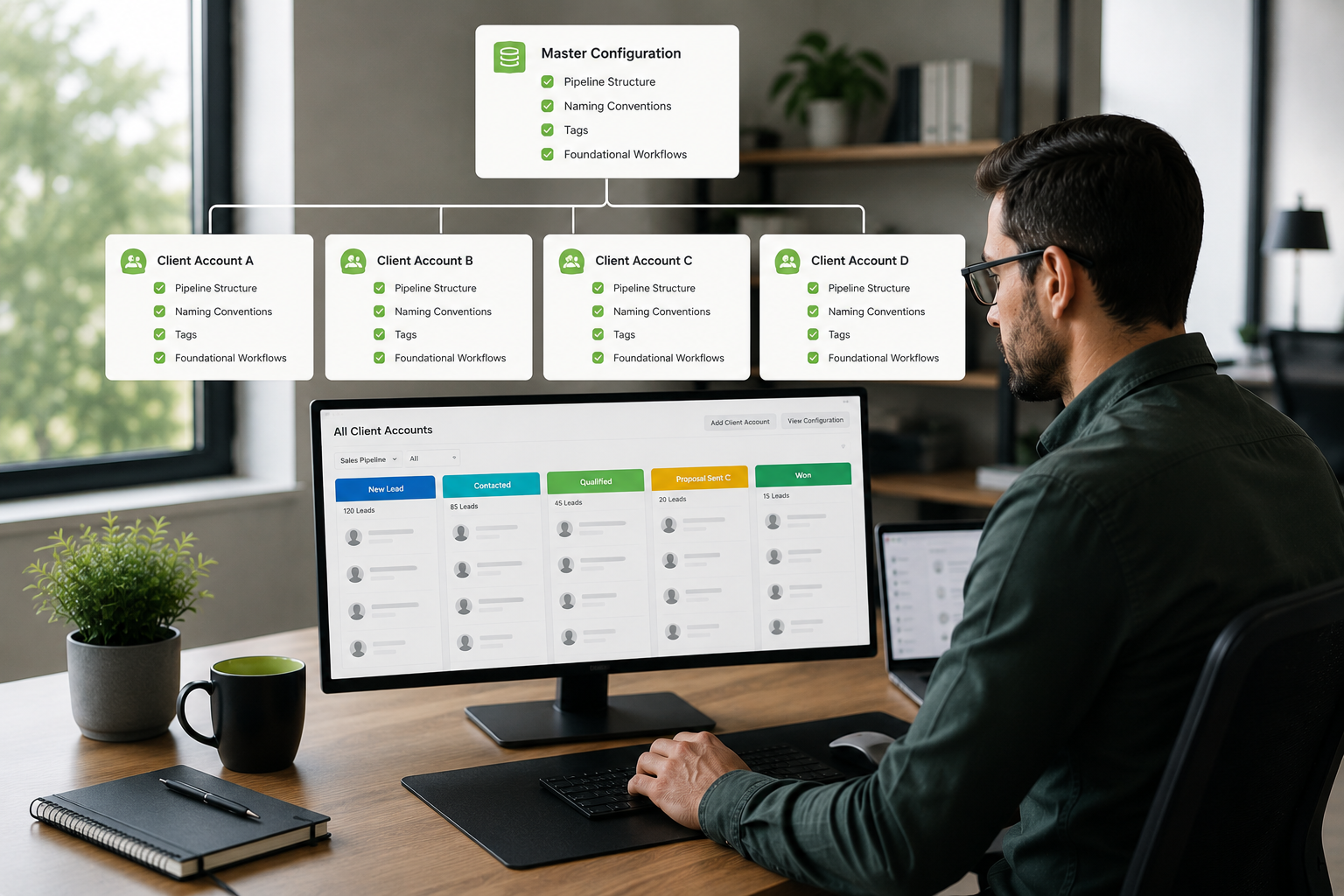
A snapshot is a saved copy of a sub-account's configuration, pipelines, custom fields, tags, workflows, funnels, and calendars, that can be applied to a new or existing sub-account to replicate that setup. Instead of manually rebuilding the same pipeline structure, the same core automations, and the same funnel templates for every new client, an agency can build it once, save it as a snapshot, and deploy it repeatedly.
Snapshots can be full, capturing an entire account's structure, or partial, capturing just a specific piece, like a single funnel or a single workflow, meant to be layered into an account that already has other things built.
When to Use a Snapshot
Rolling Out a Proven System to Similar Clients If you serve a specific niche, say, real estate agents or medical practices, and your core process (lead capture, follow-up sequences, appointment booking) is genuinely similar across clients, a well-built snapshot lets you deploy that proven system in minutes instead of hours.
Standardizing New Sub-Accounts Even beyond niche-specific systems, a base snapshot with your agency's core naming conventions, tag structure, and starting pipeline stages keeps every new sub-account consistent from day one, rather than each one drifting into its own inconsistent structure depending on who set it up.
Speeding Up Testing and Prototyping Snapshots are useful internally too, letting you spin up a test environment quickly to try a new workflow or funnel structure without touching a live client account.
Disaster Recovery and Backups Taking a snapshot before a significant change to an account gives you a clean rollback point if something goes wrong during a major restructuring or migration.
When to Avoid Using a Snapshot
Best Practices for Using Snapshots Well
Document What's Inside Each Snapshot A snapshot with a vague name and no notes becomes a liability the moment someone other than its creator needs to use it. Clear documentation of exactly what a snapshot includes, and what it's meant for, prevents it from being applied somewhere it doesn't fit.
Version and Update Your Core Snapshots Periodically Treat your most-used snapshots as living templates, not a one-time build. Revisiting them every few months to incorporate process improvements keeps every new deployment current instead of quietly outdated.
Test Before Deploying to a Live Client Apply a snapshot to a test sub-account first, or review carefully what it will change, before deploying it onto a real, active client account.
Customize After Deploying, Don't Assume It's Finished A snapshot is a starting point, not a finished product. Every deployment should be reviewed and adjusted for the specific client's needs rather than left exactly as the template applied it.
Keep Niche-Specific Snapshots Separate Resist the temptation to build one giant, all-purpose snapshot trying to cover every type of client. Separate, well-documented snapshots for each distinct niche or use case are easier to maintain and far less likely to introduce irrelevant setup into a new account.
What a GoHighLevel VA Actually Does With Snapshots
A trained VA treats snapshot strategy as part of the broader workflow and account setup process, not a shortcut that replaces understanding the client. That typically means building and documenting a base snapshot for your agency's core structure, creating niche-specific variations where your client base genuinely differs, reviewing and updating existing snapshots periodically so they don't quietly go stale, and carefully reviewing what a snapshot will change before ever applying it to a live account.
What Agency Owners Say
How Much Does Snapshot Setup Cost?
Building and maintaining snapshots is typically part of a broader engagement rather than billed as a standalone service. As a current example, GHL Plugins' dedicated VA program runs a flat $1,500 a month for 40 hours a week, with no long-term contract, covering snapshot creation and maintenance along with workflows, funnels, and the rest of your GoHighLevel needs. That sits within the roughly $1,200 to $2,500 a month range typical of dedicated, team-trained VA programs.
See exactly what it would cost to build a proper snapshot system for your agency, a straight answer, no sales pitch, on a 15-minute call.
Common Snapshot Mistakes
Applying a snapshot to a live, customized account without reviewing what it changes first. This risks overwriting client-specific work that was deliberately built that way.
Using one generic snapshot across meaningfully different client types. This leaves accounts cluttered with irrelevant stages and unused workflows.
Never updating core snapshots. An outdated snapshot spreads outdated logic into every new deployment.
No documentation of what a snapshot includes. This makes it risky for anyone other than the original creator to use confidently.
Treating a deployed snapshot as finished. Every deployment needs review and customization for the specific client, not just a one-click apply.

Frequently Asked Questions
Conclusion
A snapshot is a tool for replicating something that's actually working well, not a substitute for understanding what a specific client needs. Used deliberately, documented clearly, and updated regularly, snapshots save real time and keep new sub-accounts consistent. Used carelessly, they spread outdated or mismatched setups into every account they touch. The difference comes down to treating snapshot strategy as a maintained system, not a one-time shortcut.